The web view
way --serveopens a page with the same catalog way‘s terminal UI shows: a collapsible tree by call chain, sticky group headers, fuzzy and exact search, and a copy button on every row.
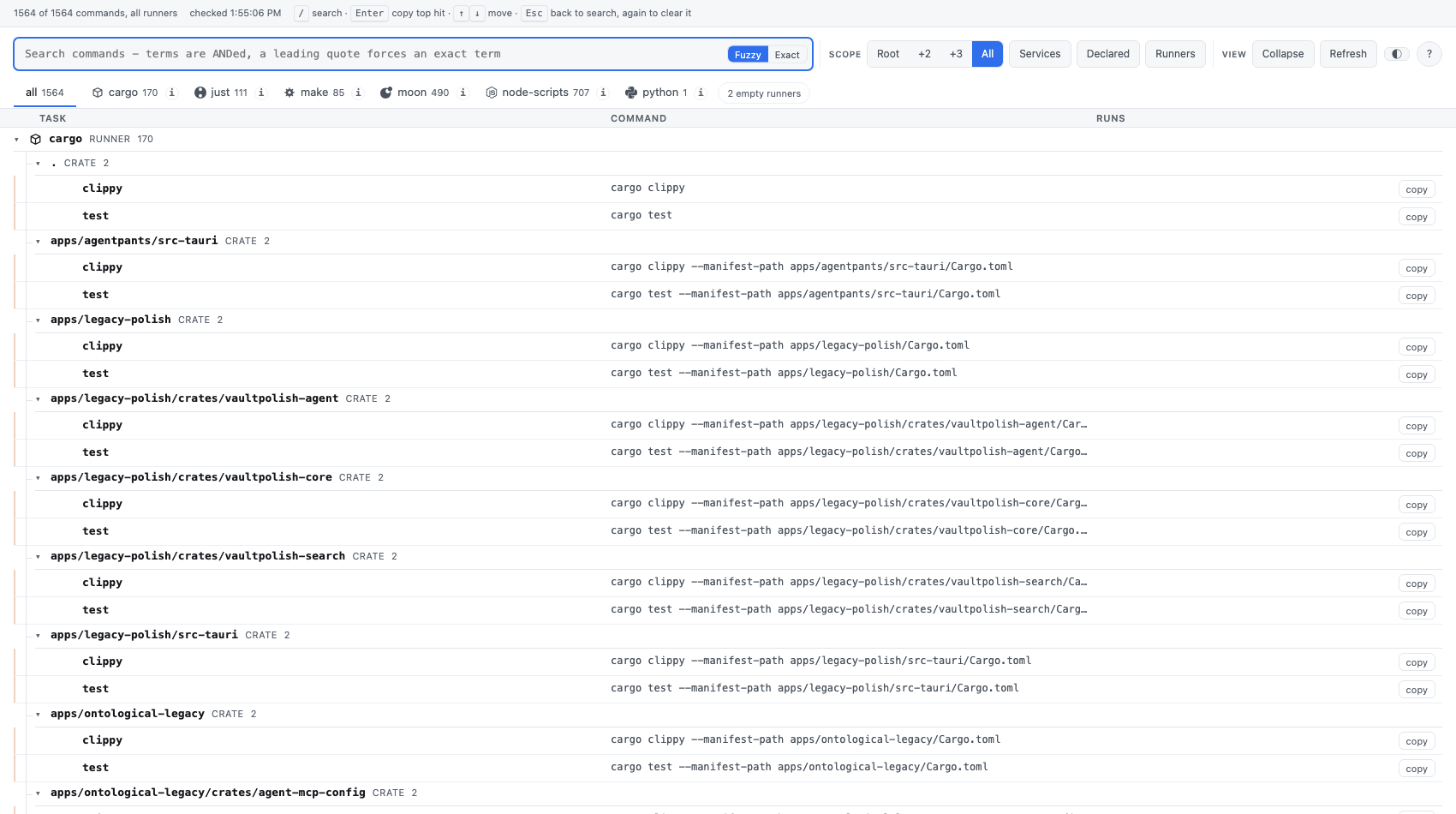
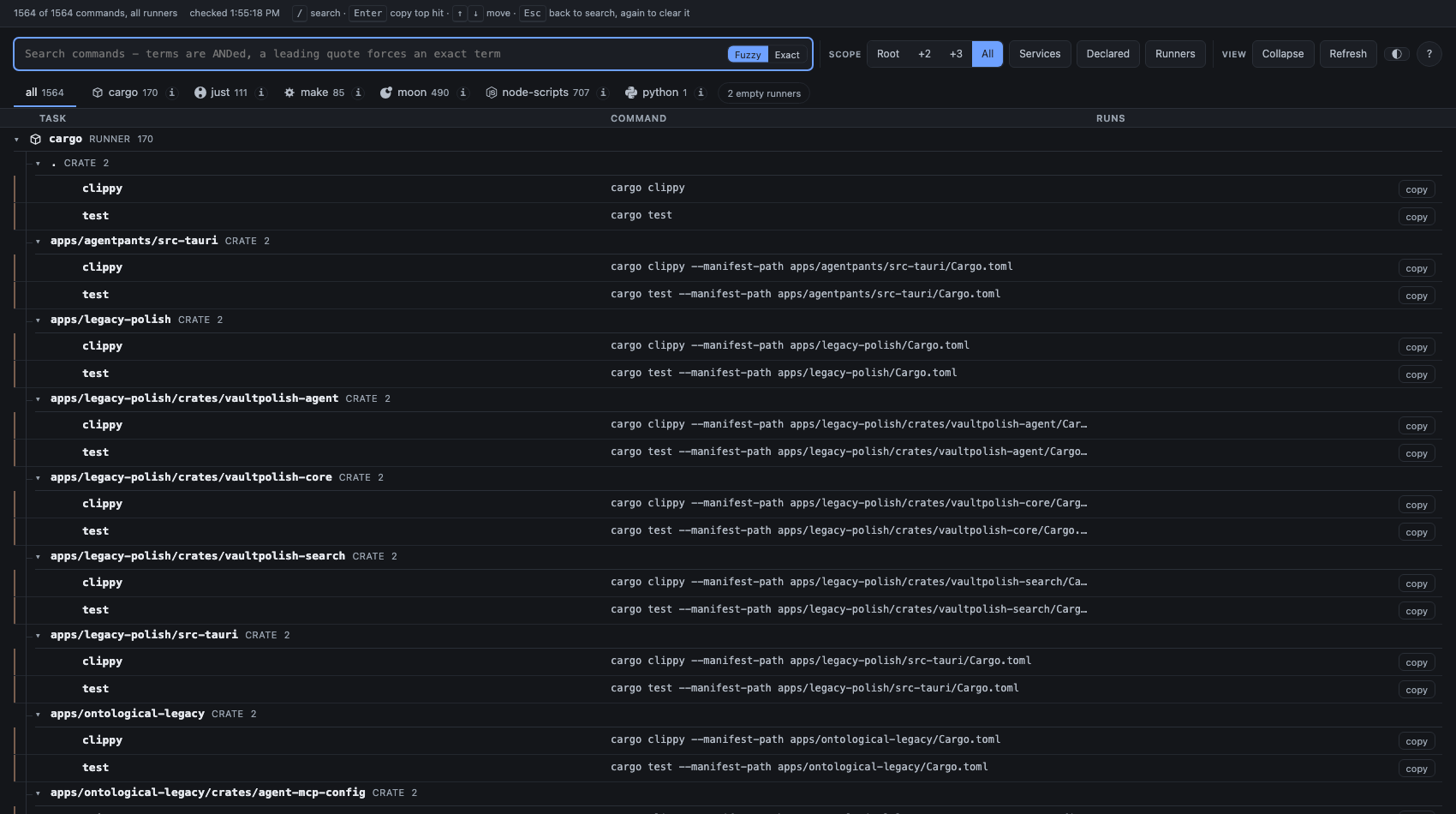
It is a server rather than a generated file on purpose. A file would be a
snapshot — add a task and the page would be quietly wrong. The server probes,
and the page refreshes on focus and on a 15-second poll, so what is on screen
is what the repository currently has. How the very first request is answered,
and how the page says so, is under Startup, and the cache
below. The server binds to 127.0.0.1, and every route is behind a token —
loopback is not by itself a boundary. See Security below.
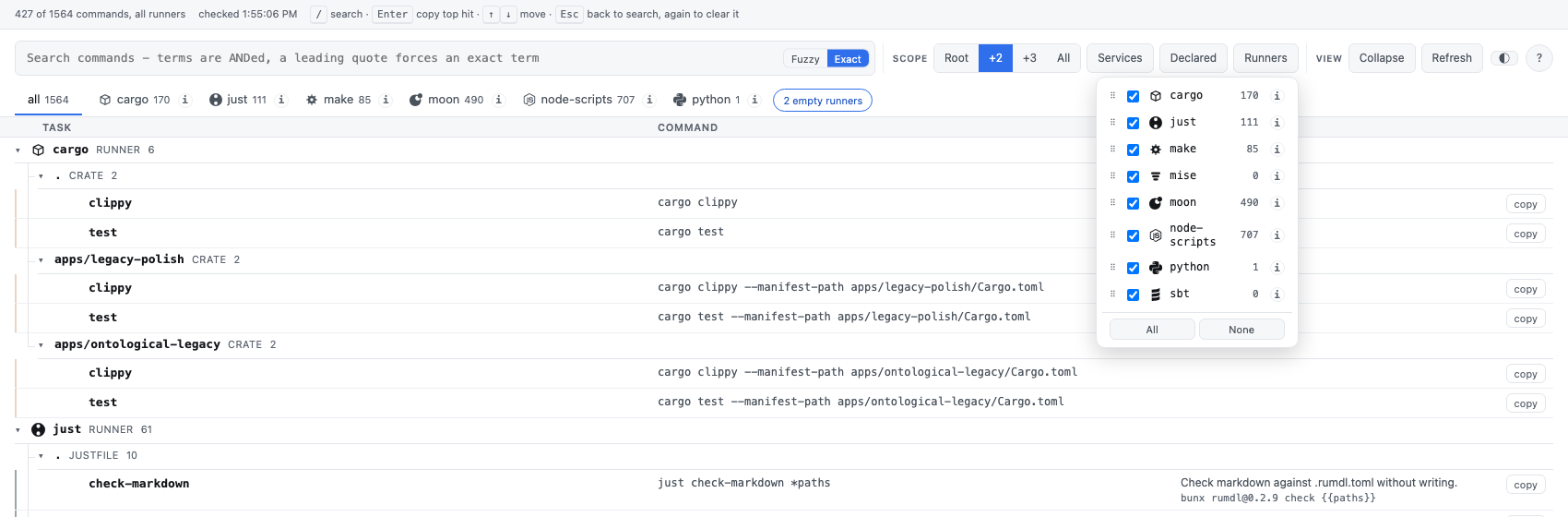
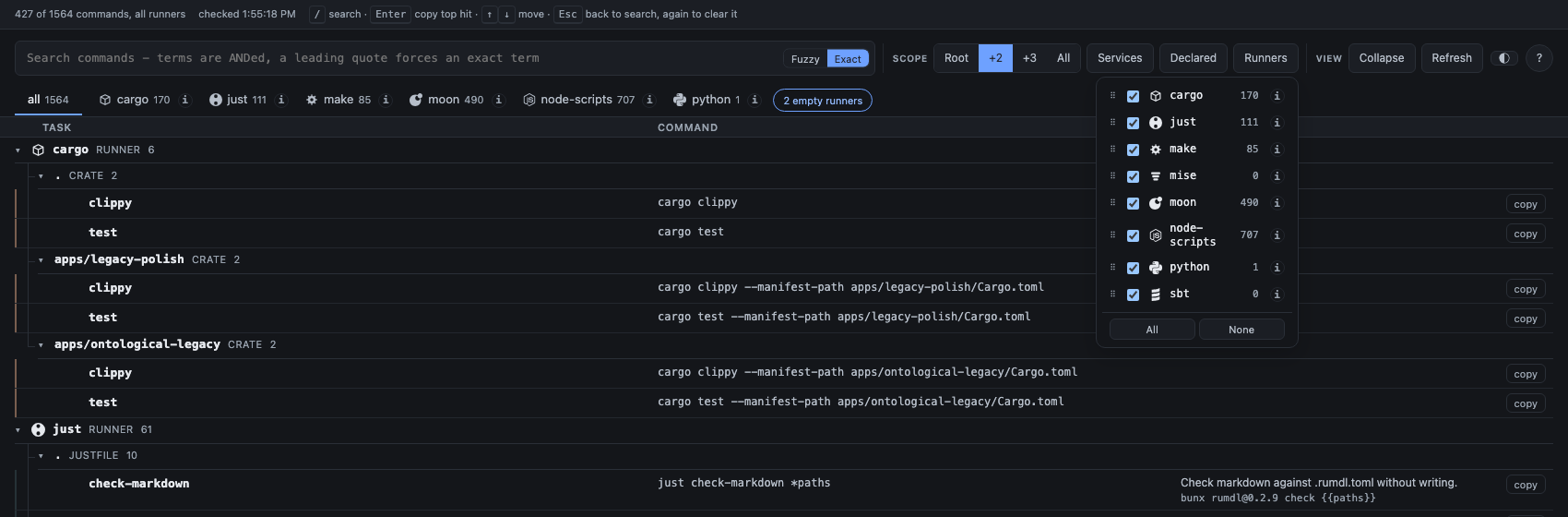
A tab per runner, plus a combined “all” tab, each labelled with a task count.
Runners that found nothing collapse into a single “N empty runners” chip
rather than each claiming a tab of their own; clicking it opens the runner
picker, where every runner is listed with its count and, if it applies, a
note that it needs --exec or that it failed to probe.
Reordering tabs
Section titled “Reordering tabs”Drag a tab to reorder it. The arrangement is saved to the browser’s
localStorage and applied everywhere the runner order matters — the tab
row, the runner picker, and the top level of the combined tree — so the three
stay in agreement. A runner not yet in the saved arrangement (a provider
added later) slots in alphabetically at the end instead of vanishing.
The tree
Section titled “The tree”Tasks are grouped by call chain into a collapsible tree, with sticky group
headers so a long list of moon projects does not lose its heading as you
scroll. The Collapse control folds every group at once; it changes
nothing about which tasks exist, only how much of the tree is visible.
Depth limits how far into the repository to look, by where a task is
declared — the shallowest setting shows only what the repository itself
declares (its own justfile, package.json, moon project), leaving out
everything that belongs to one of its packages. Declared drops tasks that
no file actually declares — cargo test and ruff check . are not written
down anywhere; they are what a crate, or a ruff-configured project, runs by
convention.
Run in terminal
Section titled “Run in terminal”Every row has a run button beside its copy button. Pressing it does not run the task in the browser — it hands the terminal way is running in over to that task.
The page is done afterwards. That is the thing to know before pressing it.
The server does not stay up behind the task: it spawns the command with
stdio: "inherit" and then exits, so the page has nothing left to talk to.
Polling stops, and every later fetch fails. The page says so — it replaces
itself with “Handed off to the terminal”, the command that ran, and a note
that you can close the tab.
What actually happens, in order:
-
The page POSTs
/api/runwith the task’s id, and — for a task that takes parameters — a list of trailing argument strings. Never argv, never a command string, never a working directory. The server looks the id up in the catalog it built itself; a task it cannot find is a404. This is deliberate: the port is reachable by any process on the machine and by any site the browser visits, so the only safe thing to accept from a request is a selector into a catalog the server produced. Accepting a command would make this an arbitrary-code-execution endpoint.The arguments are appended to that task’s own
argv, never substituted into it. The binary, the leading arguments and the working directory come only from the catalog, so the worst a hostile caller can reach is passing arguments to a command this repository already contains. Elements that are not strings are dropped rather than converted, becauseString(value)would hand a spawn"[object Object]"as a real argument. The rule isspawnArgvandacceptArgsinsrc/args.ts, and it is what their tests assert. -
The server flushes the JSON response first, so the browser is told before the handoff, then stops itself and spawns the task on its own stdin, stdout and stderr.
-
argvis spawned directly, with no shell — neverdisplay, which for a parameterised recipe carries<placeholders>a shell would read as redirections.
There is one terminal and one process, so only the first run wins. A second
concurrent run gets a 409 and the row it was pressed on says “another run
already took the terminal”. If the winner’s server is already gone when the
second request goes out, the request dies with the connection instead, and
the page reports the same fact its own way: “the terminal has already been
handed off - this page is done.”
Tasks that take arguments
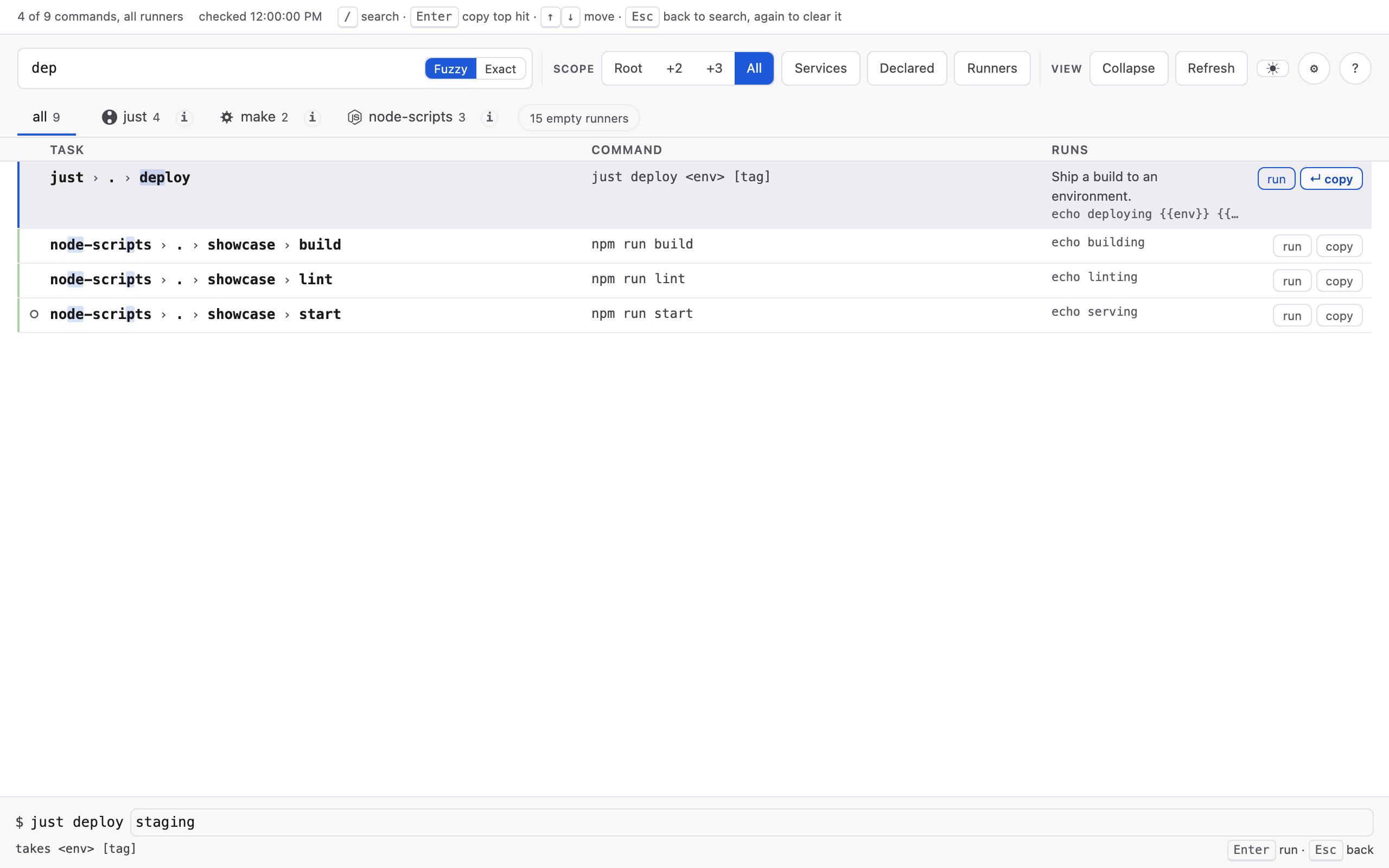
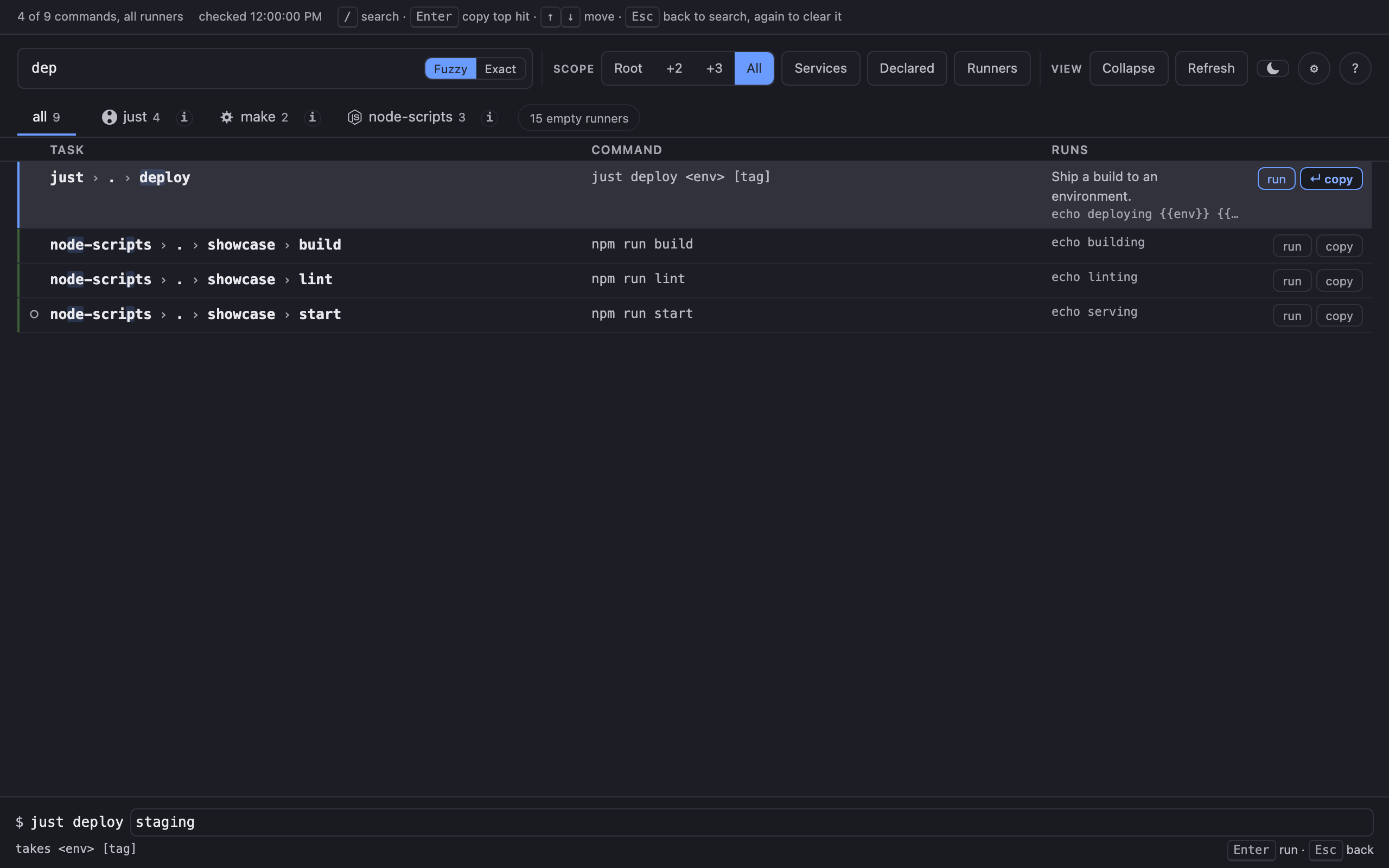
Section titled “Tasks that take arguments”A recipe like just deploy <env> [tag] cannot be run as it stands: its
argument vector holds just deploy and nothing else, because the placeholders
are not values. Pressing run on such a row opens a bar at the foot of the
page instead of handing over immediately:
$ just deploy ▮ takes <env> [tag] Enter run · Esc backThe command to the left of the field is static text, not part of the field.
Only the tail is yours to type, because only the tail is what the server will
accept — an editable just that silently still ran just would be a control
that lies.
Quoting works as a shell’s word splitting does, so "two words" is one
argument. Nothing else a shell does happens: no globbing, no variables, no
operators, because the result goes to the spawn as separate argv entries and
never through a shell. Esc closes the bar with nothing run.
A task that takes no parameters is unaffected: run hands over directly.
Search
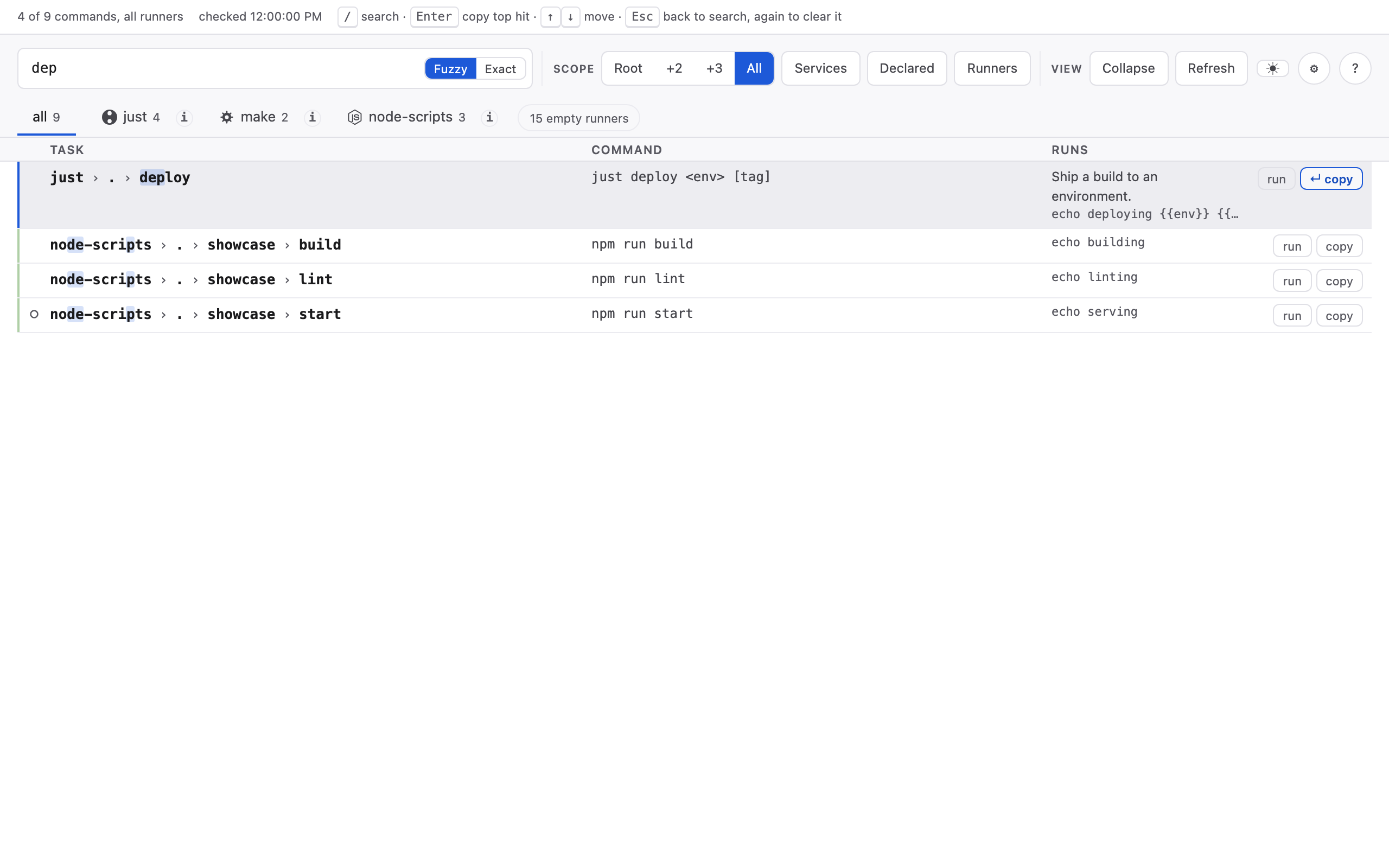
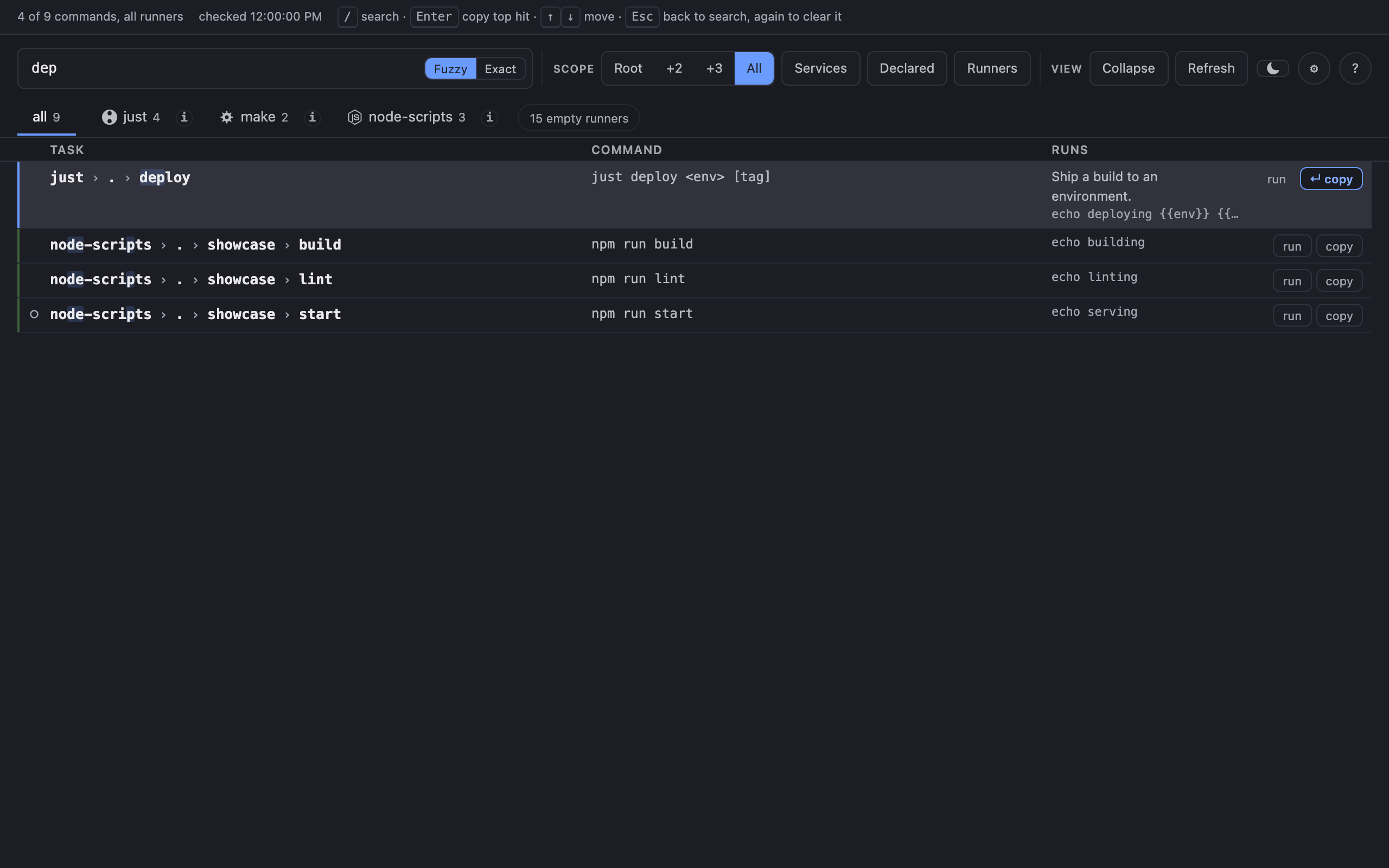
Section titled “Search”The same matcher the terminal UI uses, transpiled for the browser so the two
rank a query identically: terms are whitespace-separated and ANDed, fuzzy by
default, with a leading ' on a term forcing an exact substring match. A
toggle switches the whole query to exact mode. Services filters to tasks
marked persistent — ones that run until you stop them, such as a dev server —
each marked with a dot in the leftmost column.
Keyboard model
Section titled “Keyboard model”/ focuses the search box from anywhere on the page. Typing filters the
list as you go.
Enter to copy
Section titled “Enter to copy”While the search box is focused and a query is active, the top hit is marked as the Enter target — visibly highlighted, so pressing Enter is never a guess about which row it will act on. Pressing Enter there copies that row’s command and hands keyboard focus to the results list, so the arrow keys walk the results next — the natural move after seeing that the top hit was not the one you wanted.


Inside the list, ↑ and ↓ move between rows (clamped at the ends, not
wrapped), and Enter on a focused row copies its command. Escape returns
focus to the search box without clearing the query — clearing is the search
box’s own Escape. Every row’s copy button is reachable by Tab as well, for
a mouse-free copy with no query involved.
Startup, and the cache
Section titled “Startup, and the cache”The first /api/catalog request is answered from the stored
probe when there is one, with a real probe already
running behind it, so the page appears at once on a repository whose slowest
runner takes seconds; the rows update in place when the probe lands. Every later
request gets the freshest thing the server has, and the Refresh button is
always a real probe — an explicit refresh that could be answered from a cache is
not a refresh. Concurrent requests await one probe rather than starting several.
Nothing is served from a cold store: with execution off every exec runner already contributes a withheld report, so a cold store would yield a page of nothing but withheld rows — an empty page dressed up as an answer.
The status area says one of three things about rows that came from the store:
- Fresh — nothing at all. A span that is always present is a span nobody reads.
- Stale —
cached: just 35s old - re-probing. - Stale and slow to probe here — the louder, error-coloured span:
cached: moon (2h old, ~2.4s) - slow to probe here, so re-reading takes a moment. This is the case the cache exists for — a runner this repository has MEASURED at seconds is why the page has rows at all instead of a spinner.
Slowness and refresh cost are measured in THIS repository, from a rolling window
of the last five probe durations reported as their median. Where nothing has been
measured yet the span says never timed here rather than inventing a number.
The startup banner reports the same fact, so it is visible before the browser opens:
cached moon 2h old — re-probing nowIf you run a row that no longer exists — a task renamed since the stored probe —
the server’s 404 names the cached listing and its age rather than telling you a
row on your screen does not exist.
The cache changes nothing about trust. A cached answer is never a trust grant, clearing the cache never changes what is trusted, and a runner withheld for want of trust is never stored at all.
Settings
Section titled “Settings”The gear beside ? opens this project’s configuration as the server resolved
it — the same values way config list reports, in the schema’s own key
order: runners, execution, discovery, excluded paths.
Each section names which layer supplied its value: this project, your user config, or the built-in default. That is the question a settings screen exists to answer — a runner you did not turn off in this repository may be off because your user config says so, and the section says which.
Editing
Section titled “Editing”Runners, discovery and excluded paths are editable. Execution is not — see below.
Edits stage. A badge counts them, each changed section is marked unsaved,
and nothing reaches the file until you press Save to waypost.config.json.
Revert drops them, and so does closing the dialog: keeping edits you walked
away from would let a later Save write something you had abandoned.
Staging rather than saving on each click is deliberate. waypost.config.json
is committed, so a checkbox that quietly modified it would be a larger act than
a checkbox looks like — and the surprise would be found later, by git status.
A key waypost does not recognise survives a save. The write is a patch of the keys the screen owns, applied to the file as it is on disk, so a setting from a newer version — or one you added by hand — is left alone rather than deleted.
Four things are refused, each with the reason in the message: a key that is not
a setting (refused rather than dropped, so a typo cannot vanish silently), a
value of the wrong type, allowExec: true, and a request without the session
token.
It is deliberately not the runner picker. The picker in the toolbar filters the current session and forgets what you chose; the Runners section here describes what this project collects at all. Two different questions.
Trust, from the screen
Section titled “Trust, from the screen”Where a grant would change something, the Execution section offers it — the same confirmed action the runner picker carries, and refused by the server in the same cases, so a button is never shown where the endpoint would say no.
Untrust is offered where the repository is trusted. It removes the stored
grant, and it does not retroactively change the running session: execution
may be on because of this store or because of an explicit --exec, and the
server will not guess which. The store is the durable answer and it now says
no; start waypost again to re-probe without it. The screen says exactly that
rather than implying a revoke it did not perform.
The runner order
Section titled “The runner order”Where a dragged tab order is in force in this browser, the Runners section says
so and offers Reset to configured order. Before this there was no way back
short of clearing site data — a local override that outranks runners.order
with no way to clear it is a trap.
Execution is shown rather than offered as a toggle, because it is not a
symmetric switch. A project’s own waypost.config.json may only ever turn execution
off; a file that tries to turn it on is ignored, and the screen surfaces that
warning rather than showing false with no explanation of why the file did
nothing. Turning execution on is the trust grant — see
Trust & execution.
The screen reads GET /api/config and writes POST /api/config, both behind
the session token like every other API route.
Themes
Section titled “Themes”A single button in the toolbar cycles the colour scheme: System → Light →
Dark → System. “System” means no explicit choice is stored and the page
follows the OS-level prefers-color-scheme; Light and Dark override it in
either direction. The choice is saved to localStorage and restored on the
next visit, per browser.
Security
Section titled “Security”The server binds to 127.0.0.1, but loopback is not by itself a boundary:
other local users on the machine can reach that port and can read a running
process’s argv and environment, and any website the browser visits can issue
cross-origin requests to it. So every route is behind a token, and there are
two of them.
The boot token signs a browser in. It is 128 bits of hex from the CSPRNG,
it appears in the URL way opens (/?boot=…) and nowhere else,
and it is single-use — the first request that presents it burns it. It expires
60 seconds after the URL is actually handed to the user, not 60 seconds after
it was created: the first catalog request runs in between, and on a cold tree
with nothing stored that is long enough that a clock started earlier would
overstate the window. It is accepted on the page routes only, never on
/api/*.
The session token is what the page then uses. Also 128 bits of hex, one
per server process. It never appears in a URL and never in an argv, because
those are readable by other local users. It is embedded once into the served
HTML as an inline script and the page keeps it in module state only —
deliberately not localStorage, sessionStorage or a cookie, all of which
outlive the tab or ride along on requests the page did not make. A single
authFetch wrapper attaches it as the request header x-waypost-token, and
every /api/* route requires it.
A header rather than a cookie is the point, not an implementation detail. A
cookie would ride along on a cross-origin request from any site the user
happens to be visiting — that is CSRF. A request header does not, and
x-waypost-token is a non-simple header, so a cross-origin fetch must first pass
a CORS preflight this server never answers.
Two smaller properties:
- Tokens are compared with a constant-time equality that has no early exit, so a near miss is not distinguishable by timing.
- A page-route auth failure returns one styled 401 document for every cause — no token, wrong token, spent token, expired token. It says nothing about which check failed, because that is what an attacker would use to aim and the authorized caller never needs it. The remedy it prints is to stop way in the terminal and start it again for a fresh link.
POST /api/trust is gated a third time, beyond the method and the token:
the grant must be applicable — the same condition that decides whether the
page may offer the button at all. The token proves who is asking; it never
proves that asking made sense. Without this check a grant could override
--no-exec, or write a standing grant to the store under a one-off --exec,
with the rule enforced only by hiding a button.
That button is the toolbar’s Trust this repository, offered on a runner that was withheld for want of execution; it asks for confirmation, and on a grant the server returns a freshly probed catalog so the page re-renders in one round trip. What trust means and where it is stored is its own page.